
How One Weak Network Device Can Undermine a High-End Home Technology System
A modern home’s technology is only as reliable as the network behind it.
In a luxury residence, the network is not just for phones, laptops, and basic internet access. It supports: lighting control, streaming video, distributed audio, surveillance cameras, window treatments, pools, irrigation, access control, and allows for the remote interfacing and integration of all of them.
When the network is appropriately designed, these systems are responsive and dependable. When the network is poorly designed, the entire home can feel unreliable, even when the individual devices are high quality.
A low-capacity router, poorly placed access points, or consumer Wi-Fi extenders may seem like trivial details. However, in practice, these can become critical failure points for many other intelligent living subsystems.
For large Hamptons homes, Manhattan residences, and multi-structure properties, thoughtful network design is paramount.
Why the Network Matters in a Connected Home
In a connected residence, many systems rely on the network to communicate, respond, update, and remain accessible.
A residential network may support:
• Distributed audio: Systems like Sonos and Bluesound are controlled from your phone over Wi-Fi. If you are in a part of the property with speakers but no Wi-Fi coverage, you may not be able to switch tracks or change the volume without moving back into range of the network.
• Streaming video: HD video is one of the most bandwidth-heavy activities regularly performed on a home network, whether it is a video call for work or sitting down to watch your favorite show. Poor network connections can lead to buffering, reduced resolution, or outright failure.
• Surveillance cameras: One of the best features of modern surveillance systems is the ability to view recordings and stream live feeds remotely. That feature requires a stable internet connection to the NVR and cameras.
• Home automation and control systems: Contemporary control systems have largely moved to IP control for many of the home’s subsystems because of its speed and reliability compared with IR or serial control. Setting systems up this way depends on having the right network infrastructure in place.
• Lighting control: With few exceptions, lighting control in a home will still work without being connected to the wide area network. However, wireless lighting control relies heavily on the home’s network infrastructure to communicate, and even panelized systems require a network connection for off-site interaction.
• Motorized window treatments: The same considerations that apply to lighting control also apply to motorized window treatments.
• IP power management: Connecting power management to the network allows devices to be power-cycled remotely for service and troubleshooting.
• Access control: These systems often rely on Wi-Fi or other wireless communication tied back to the network, and they require a network connection for any off-site interaction.
• HVAC controls: Thermostats will still function as thermostats regardless of whether they are connected to the internet, but offsite interaction and control system integration require a network connection.
• Pool controllers: Want to turn on the pool heater at the vacation house before you arrive? It will need a network connection.
• Irrigation systems: Modern irrigation controllers rely on the internet for updates, offsite interaction, and advanced features like weather monitoring.
• Remote system monitoring and support: Remote support, monitoring, and proactive updates can save hours of frustration and thousands of dollars in onsite service over the life of a system.
When the network is stable, these systems respond quickly and consistently. They can be managed from inside the home, from outdoor spaces, and often from outside the property when needed.
When the network is unstable, problems can appear across the entire technology system.
A streaming issue may not be a problem with the television. A surveillance camera issue may not be a camera problem. A smart home issue may not be an automation problem. Very often, the network is the first place to look.
How Network Problems Often Show Up
Network issues do not always look like obvious Wi-Fi problems. In a larger home, they often appear as separate frustrations across different rooms or systems.
To the homeowner, these may feel like unrelated problems. One day it is the media room. Another day it is the cameras. Later, it is the home office, guest suite, pool house, or outdoor entertaining area.
But when several connected systems behave inconsistently, the issue is often not the individual device. It is the shared infrastructure behind them.
The Problem with Weak Network Components
Consumer-grade networking equipment is often designed for convenience and low upfront cost. That may be enough for a small apartment or basic internet use, but it can become limiting in a larger residence with many connected systems.
A single weak component can affect the performance of an otherwise well-designed technology system.
Residential networks are made up of several key pieces, and each needs to be selected based on what the home is expected to support.
A network that works for basic internet browsing may not be strong enough for streaming, surveillance, lighting control, distributed audio, remote service, and whole-home Wi-Fi coverage.
• Router: The router is the main connection between the home and the internet. In a larger residence, it needs enough capacity to handle video calls, streaming, cameras, control systems, and remote support at the same time. Some homes also benefit from a router with multi-WAN capability, which allows a second internet connection, such as Starlink, to act as a backup if the primary service goes down.
• Switches: Switches connect the hardwired devices throughout the home. They are especially important for equipment like access points, cameras, TVs, control processors, and rack-mounted components. Many of these devices can also be powered through the network cable, so the switch needs to have enough power available to support them reliably.
• Wireless access points: Access points are what create Wi-Fi coverage throughout the home and property. They should be hardwired whenever possible so each one has a strong connection back to the network. This is much more reliable than relying on one wireless device to repeat the signal from another, especially in larger homes, outdoor areas, guest houses, or pool houses.
The device itself may be inexpensive. The problems it creates are not.
In a high-end home, unreliable networking can affect comfort, surveillance, entertainment, remote work, and the everyday experience of using the home. It can also make troubleshooting more difficult because the visible symptom may appear in a system that is not actually the root cause.
Why “Good Enough” Wi-Fi Is Not Enough
In a luxury home, Wi-Fi has to do more than provide a basic internet connection.
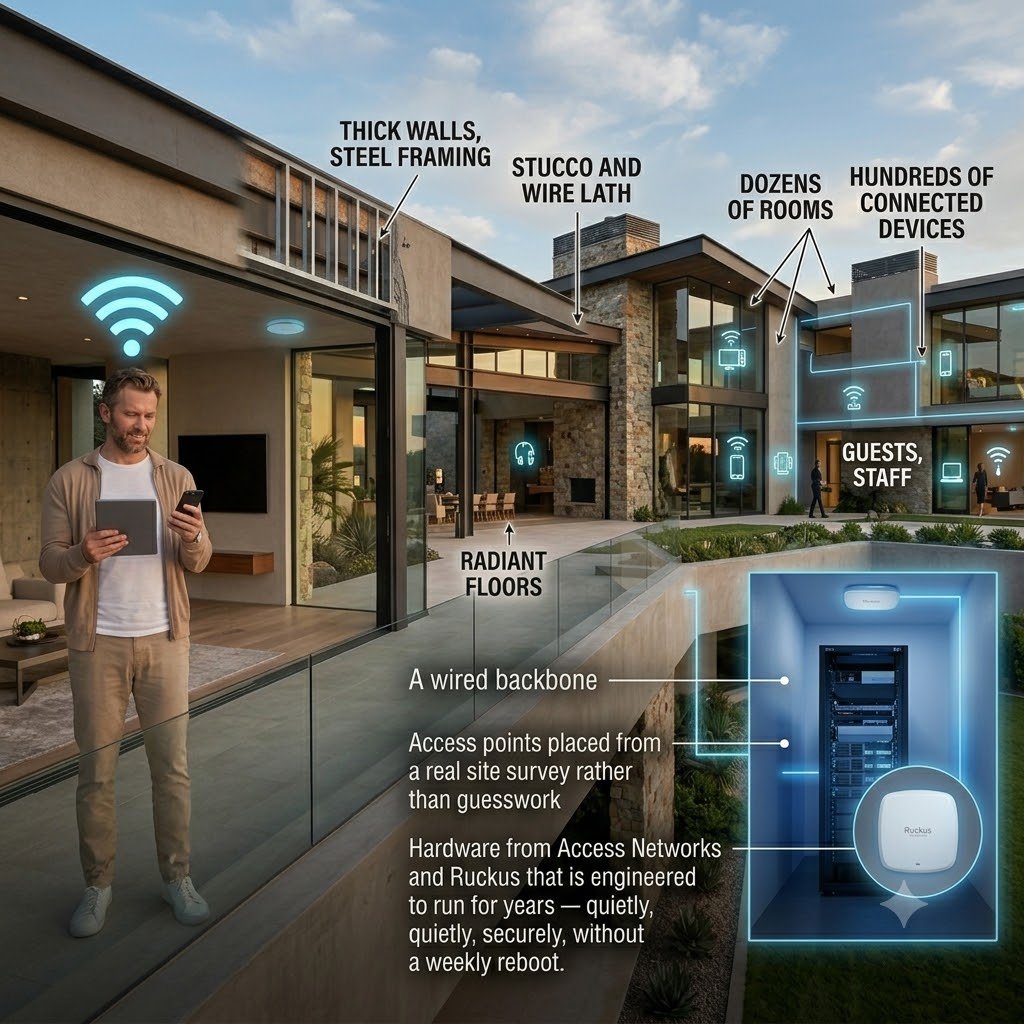
The size of the property, the way the home is built, and the number of people using the network all have a major impact on performance. Large floor plans, multiple levels, outdoor living areas, guest houses, garages, pool areas, and long driveways can all create coverage challenges. Stone, concrete, steel, glass, radiant heat, and other construction materials can also weaken or block wireless signal.
A few off-the-shelf routers, extenders, or poorly placed access points may work in a smaller home, but they rarely provide consistent coverage across a large property. They can also create dead zones, slow roaming between areas, and unreliable performance when the home is full of family, guests, staff, and connected devices.
Strong Wi-Fi is not just about speed. It is about thoughtful access point placement, reliable coverage, capacity for real-world use, and predictable performance throughout the property.
Why Planning Matters in New Construction and Renovation
The best time to plan a smart home network is before the home is finished.
During new construction, renovation, or a major estate expansion, early planning allows the technology team to coordinate wiring paths, equipment locations, access point placement, outdoor coverage, and future service access before walls, ceilings, millwork, and exterior finishes are complete.
After construction, these same fixes are often more expensive, more disruptive, and less discreet.
For larger homes, this planning becomes even more important. A network may need to support the main residence, guest house, garage, pool house, outdoor living areas, landscape systems, gates, cameras, and remote work spaces. Those needs should be considered before the home is closed up, not after the homeowner starts experiencing weak signal and inconsistent performance.
Reliability and Serviceability Matter
A professional residential network should be designed so that connected systems stay online, coverage is consistent, and support is practical when something needs attention.
That means the network should be organized, documented, and built with long-term service in mind.
A well-planned network makes it easier to understand:
Which devices are connected
Where equipment is located
How access points are distributed
How guest access is separated from private systems
How smart home, AV, surveillance, and personal devices are organized
How remote support can be provided when needed
Without that organization, small issues can become time-consuming service problems. A poorly labeled rack, undocumented equipment, or a collection of mismatched network devices can make it harder to identify and resolve the real cause of the issue.
The goal is not to make the network something homeowners have to think about every day. The goal is the opposite: a network that quietly supports the rest of the home.
A Better Approach to Residential Network Design
Thoughtful residential network design starts with the property itself.
The right design considers:
Size and layout of the home
Construction materials
Number of connected devices
Indoor and outdoor coverage needs
AV and streaming requirements
Surveillance camera locations
Smart home and lighting control systems
Guest access
Equipment locations
From there, the network can be designed as infrastructure, not an afterthought.
In an existing home, a professional network assessment can help identify weak points, outdated equipment, coverage gaps, and serviceability issues that may be affecting the performance of other systems.
In a new build or renovation, network planning should happen early enough to coordinate with the architect, builder, electrician, interior designer, and other trades. That coordination helps preserve finished spaces while giving the home the infrastructure it needs for reliable performance.
The Network Should Work Quietly in the Background
The best residential networks are rarely noticed.
They do not call attention to themselves. They do not require homeowners to restart equipment, move closer to a router, or wonder why one system works today and fails tomorrow.
Instead, they support the way the home is actually used.
A reliable network allows lighting control, AV, surveillance cameras, shades, automation, and remote work to feel consistent and intuitive. It also gives the service team the visibility and structure needed to support the home over time.
That is especially important in larger residences, where technology systems are often spread across many rooms, floors, outdoor spaces, and separate structures.
When to Evaluate Your Home Network
It may be time to evaluate the network if you notice:
Frequent buffering or dropped connections
Weak Wi-Fi in certain rooms or outdoor areas
Smart home devices disconnecting
Surveillance cameras loading slowly or going offline
Inconsistent performance from streaming or AV systems
Poor video call quality
Problems that seem to move from one system to another
Difficulty getting reliable remote support
These issues are not always caused by the network, but the network should be one of the first systems reviewed.
A professional assessment can help determine whether the issue is coverage, capacity, equipment quality, wiring, configuration, or system organization.
Frequently Asked Questions
Why does a smart home system depend on the network?
A smart home system depends on the network because many connected systems need to communicate with each other. Lighting control, audio, video, surveillance cameras, motorized shades, control interfaces, mobile apps, and remote support all rely on stable connectivity.
When the network is strong, these systems feel simple and responsive. When the network is weak, they may respond slowly, disconnect, or perform inconsistently.
Can one weak router or access point affect the entire home?
Yes. One weak router, poorly placed access point, or low-quality Wi-Fi extender can create coverage gaps, poor device handoff, limited capacity, and inconsistent performance across multiple systems.
In a larger home, this can make the technology feel unreliable even when the individual devices are not the real problem.
Is home networking only about internet speed?
No. Speed is only one part of network performance.
A strong residential network also needs reliable coverage, proper equipment, device capacity, security, organization, and long-term serviceability. A fast internet plan will not fix poor access point placement, overloaded equipment, weak outdoor coverage, or an unorganized network.
Why is consumer Wi-Fi often not enough for a larger home?
Consumer Wi-Fi equipment is often designed for simpler environments. Larger homes may require multiple access points, structured wiring, outdoor coverage, guest network separation, support for many connected systems, and better visibility for service.
For a luxury residence, the network should be planned around the property, not patched together after problems appear.
Why do Wi-Fi problems often look like smart home problems?
Most homeowners do not experience the network as a separate system. They experience it through the systems they use every day.
If the network is weak, the symptoms may look like a lighting issue, an AV issue, a surveillance camera issue, or an app issue. In many cases, the device is not the problem. The connection behind it is.
When should networking be planned during a home project?
Networking should be planned as early as possible, especially during new construction, renovation, or estate expansion.
Early planning helps coordinate wiring, equipment locations, access point placement, outdoor coverage, remote support access, and future service needs before finishes are complete.
How can Home Technology Experts help?
Home Technology Experts designs residential networks as part of the full technology plan for the home. That includes Wi-Fi coverage, structured wiring, equipment locations, outdoor connectivity, smart home control, AV, surveillance, and long-term support.
For larger homes, new construction, renovations, and Hamptons properties with outdoor living areas or detached structures, early network planning helps prevent avoidable problems before they affect daily life.
The Takeaway
A single weak network component can create problems across an otherwise well-designed home technology system.
The issue is not just internet speed. It is reliability, coverage, security, serviceability, and the ability of every connected system to work as intended.
When the network is planned properly, it becomes something the homeowner rarely has to think about.
That is the point.
HTE designs residential networks to support the way the home is actually used — reliably, predictably, and with the long-term needs of the property in mind.