
Hamptons Estate Connectivity
Planning Starlink for Hamptons Estates: Siting, Coastal Conditions & Network Integration
A reliable connection begins with understanding the property. Rooflines, mature trees, coastal exposure, and existing network infrastructure all influence the right approach.
A Hamptons home can be beautifully designed, thoughtfully equipped, and still face unexpected connectivity challenges.
Mature trees may obscure the sky. A complex roofline can limit suitable mounting locations. Coastal conditions place additional demands on exterior equipment. And the residence may already have a sophisticated network serving several buildings and outdoor spaces.
These are not reasons to dismiss Starlink. They are reasons to evaluate the property before deciding how it should be installed and integrated.
Planning Starlink for a Hamptons estate requires evaluating satellite visibility, mounting conditions, cable pathways, existing networking equipment, and long-term service access.
The goal is not simply to activate another internet connection. It is to understand whether Starlink is appropriate for the property and how it can support the homeowner's existing technology.
The right Starlink location is not always the most convenient roof location. A successful plan balances satellite visibility, architectural discretion, safe mounting, network access, and future maintenance.
1. Start With the Property, Not the Equipment
Two neighboring Hamptons properties may require very different approaches to satellite internet.
One home may have a relatively open roof with good sky visibility and a convenient pathway to the network rack.
Another may sit beneath mature oaks, include multiple roof elevations, or have significant architectural constraints.
Properties in Southampton, Water Mill, Bridgehampton, Sagaponack, East Hampton, Amagansett, and Montauk can present different combinations of landscape, structure, access, and exposure.
These conditions must be assessed at the individual property level. A town name alone does not determine satellite visibility or installation suitability.
Sky Visibility
Trees, buildings, roof features, and other obstructions may interrupt the satellite connection.
Architectural Placement
The mounting location should respect the design of the residence while meeting technical requirements.
Coastal Exposure
Wind, salt exposure, moisture, and exterior material conditions can affect mounting and maintenance.
Network Infrastructure
Existing routers, access points, switches, and equipment locations determine how internet service reaches the property.
2. Roof Siting and Satellite Obstructions
Starlink requires a sufficiently unobstructed view of the sky to communicate with its satellite network.
The requirements differ from installing a conventional television satellite dish, which generally points toward a fixed position in the sky.
Starlink communicates with moving satellites. Obstructions across the antenna's required field of view can therefore affect connectivity.
Mature Trees and Landscape Canopies
Mature trees are often among the defining features of a Hamptons estate. They provide privacy, scale, and a sense of permanence.
They can also create obstacles for a satellite internet connection.
Branches and foliage may block portions of the sky even when the antenna appears to have a clear view from ground level.
A proper site assessment considers the required sky view, tree canopy, seasonal changes, and alternative locations.
The objective should not be to alter mature landscaping unnecessarily. It should be to find an appropriate location that works with the property.
Homeowners can begin evaluating their site using HTE's Starlink self-survey and obstruction guide before a final mounting location is selected.
Rooflines, Dormers, and Chimneys
Hamptons architecture frequently includes complex rooflines, dormers, chimneys, and other prominent architectural features.
These elements can influence both the antenna's field of view and the feasibility of mounting it.
An antenna positioned behind a chimney or beneath a higher roof section may experience obstructions despite being mounted above ground level.
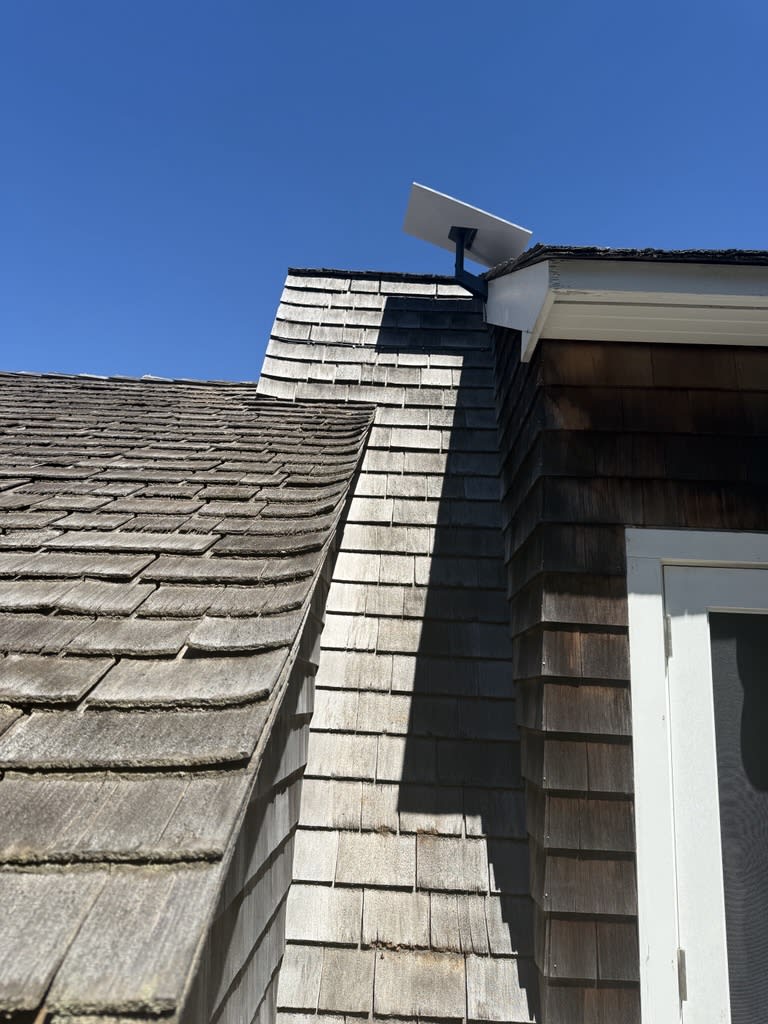
Suitable roof positions should be evaluated for visibility, structural conditions, mounting requirements, safe access, and appearance.
3. Protecting the Architecture During Roof Installation
A permanent exterior installation should respect the materials and construction of the home.
Roof penetrations, cable routing, mounting hardware, and weatherproofing all deserve careful consideration.
On properties with specialty roofs, custom architectural details, or difficult access, the appropriate approach may require coordination with a qualified roofer, structural professional, or another specialty contractor.
Selecting a Mounting Location
The preferred location should balance several requirements:
- Adequate sky visibility for the selected Starlink system
- A suitable structural mounting surface
- Compliance with equipment mounting specifications
- Safe installation and future service access
- Minimal visual impact on important architectural views
- Practical cable routing to the network equipment
- Appropriate weatherproofing and protection of finished materials
A non-penetrating mounting solution may be suitable in some situations, while other conditions require a different engineered approach.
No single mounting method is appropriate for every roof.
Coastal Wind and Salt Exposure
Waterfront and coastal properties introduce additional considerations.
Wind loading, salt exposure, corrosion resistance, and the condition of exterior building materials may affect the mounting design.
Appropriate hardware, manufacturer specifications, and applicable building requirements should guide the installation.
A weather-resistant antenna does not eliminate the need to assess the supporting mount and cable system.
4. Finding a Cable Path That Respects Finished Spaces
The location with the best satellite visibility may not be close to the room containing the home's networking equipment.
This creates another important planning decision.
The antenna connection must reach the appropriate equipment location while respecting cable specifications, pathway requirements, and the home's finished materials.
Possible routes may include existing conduit, attic spaces, equipment chases, utility areas, or carefully planned exterior pathways.
Where the selected antenna location is too distant from the network rack for a permitted direct cable run, the design may need an intermediate equipment location or another supported networking approach.
Cable lengths and hardware should be verified for the specific Starlink generation. They should not be assumed interchangeable.
Installation complexity can also affect project requirements. HTE's Starlink installation planning calculator provides another resource for evaluating the proposed installation.
5. Integrating Starlink With an Existing Managed Network
Many larger Hamptons homes already have a professionally designed network serving the residence and surrounding property.
The infrastructure may include a dedicated router or firewall, network switches, multiple wireless access points, and hardwired systems.
These networks may support:
- Main residence Wi-Fi and hardwired devices
- Guest houses and pool houses
- Outdoor entertainment spaces
- Home automation and lighting control
- Residential video surveillance
- Staff workspaces and guest networks
Adding Starlink should not automatically mean replacing those systems.
In many cases, the appropriate strategy is to introduce Starlink as another internet source while retaining the existing managed network.
The network equipment can then continue distributing connectivity to the areas and devices it already serves.
For more information about the local network itself, explore HTE's residential network and whole-home Wi-Fi services .
For a more detailed explanation of integrating the internet provider, read how Starlink connects to an existing home network .
6. Planning Internet Failover for Hamptons Properties
A property may already have cable or fiber internet and still benefit from Starlink as a secondary connection.
This can be especially relevant for seasonal homes, where owners depend on remote connectivity while away.
A properly configured multi-WAN router can monitor the primary internet service and transition supported traffic to Starlink when that service fails.
That transition depends on compatible equipment, correct configuration, and an operational Starlink connection.
Some active sessions may need to reconnect. Automatic failover should not be described as guaranteed interruption-free connectivity.
A complete plan also considers backup electrical power for the antenna, router, switches, and essential network equipment.
Without power to those components, having a second internet service will not keep the property online.
Our companion article, Starlink as backup internet for second homes and estates , explores continuity and failover in greater detail.
7. Extending Reliable Connectivity Across an Estate
A working Starlink connection at the main house does not guarantee reliable connectivity throughout a large property.
Pool houses, guest cottages, detached garages, gates, and outdoor living areas may need their own wired or wireless network connections.
These connections should be evaluated separately from the Starlink service itself.
An internet provider delivers connectivity to a network location.
The home's network design determines how that connection reaches rooms, buildings, and exterior spaces.
Depending on the property, that may involve properly designed Ethernet, fiber, wireless bridges, or managed access points.
The larger the estate, the more important it becomes to understand how the entire network is connected and supported.
8. Managed Networking and Long-Term Serviceability
The most thoughtful installation plan considers how the system will be maintained after the project is complete.
A roof-mounted antenna may eventually require inspection or replacement. Network equipment may need configuration changes. The homeowner may add devices or change internet providers.
For a second home, supportability is particularly important because the owner may not be present when a problem develops.
A well-documented system should make it easier to identify equipment, understand connections, and troubleshoot problems.
Managed network tools may also support connectivity monitoring, remote diagnostics, and proactive service, depending on the installed equipment and support agreement.
Home Technology Experts approaches residential connectivity as an ongoing relationship, not simply a one-time equipment installation.
A Hamptons Starlink Planning Checklist
Before specifying a permanent installation, homeowners and project teams should consider the following:
- Survey the sky. Evaluate potential antenna locations for obstructions.
- Review the roof. Confirm mounting suitability, safe access, and structural conditions.
- Consider the landscape. Account for mature trees and permanent obstructions.
- Evaluate coastal exposure. Review wind, weather, and corrosion considerations.
- Plan the cable pathway. Identify a route that respects the architecture and equipment requirements.
- Review the existing network. Determine how Starlink connects to routers, switches, and access points.
- Define its role. Decide whether Starlink is primary internet or backup service.
- Test the completed system. Confirm performance, connected devices, and failover.
- Plan for service. Document equipment, mounting locations, monitoring, and support.
Frequently Asked Questions
Where should Starlink be mounted on a Hamptons property?
The best location depends on sky visibility, roof construction, obstructions, mounting requirements, cable pathways, and safe service access. A property-specific assessment is recommended.
Can mature trees affect Starlink performance?
Yes. Trees and foliage can obstruct portions of the sky required for satellite communication. Visibility should be evaluated at the proposed mounting position.
Is Starlink suitable for waterfront homes?
It may be suitable, but coastal properties require consideration of wind, salt exposure, mounting conditions, weatherproofing, and long-term service.
Can Starlink connect to an existing estate Wi-Fi system?
In many cases, yes. Starlink can provide internet access to a compatible existing router and managed network, allowing established access points and connected devices to remain in use.
Can Starlink automatically take over when Optimum or another provider fails?
With a suitable multi-WAN router and properly configured failover policies, Starlink can provide a secondary connection. Certain active sessions may still be interrupted during the transition.
Does Starlink provide Wi-Fi coverage to guest houses and outdoor spaces?
Not automatically. Whole-estate coverage depends on local network infrastructure, including access points, cabling, and links between buildings.
Should Starlink be planned before or after a renovation?
Planning during design or early construction can make cable routing, mounting coordination, and equipment placement easier. Existing finished homes can also be evaluated for suitable installation options.
A Connection That Respects the Property
Hamptons homes deserve technology that works with the architecture rather than competing with it.
For Starlink, that begins by understanding the building, landscape, mounting conditions, network infrastructure, and expectations for long-term use.
The best plan is not always the most elaborate. It is the one that addresses the property's actual needs without introducing unnecessary complexity.
For a broader look at professional installation and connectivity services, explore HTE's Starlink installation and reliable internet services .
Luxury is simplicity.
Hamptons Connectivity Planning
A better Starlink plan begins with understanding your property.
Home Technology Experts can help evaluate satellite visibility, architectural considerations, existing networking, and connectivity goals before a solution is selected.
Discuss Your Property