
Which Starlink is Best for Home Internet Backup?
For most professionally networked homes, HTE currently views Starlink V5 as the strongest general-purpose backup-internet option where available. Standard 4 remains a capable alternative, while Starlink Performance is better suited to severe environments and especially demanding continuity requirements.

Starlink’s new hardware options create more ways than ever for HTE to improve your internet connection. Which one is right for you?
Starlink has introduced several new hardware options, making the decision more complicated than it first appears. One model is smaller. Another advertises a slightly higher maximum speed. One includes a more powerful Wi-Fi router. Another is built for harsh commercial and mobile environments.
It is natural to assume that the Starlink with the highest advertised throughput must be the best choice. For most of the homes we work in, however, that is not how we evaluate it.
Home Technology Experts typically uses Starlink as a secondary internet connection—a backup path that helps keep the home connected when the primary cable or fiber service goes down. We are not relying on Starlink to provide Wi-Fi throughout the home. The home’s professionally designed network continues to handle that job.
That distinction changes the entire comparison.
How We Typically Use Starlink
In a professionally integrated home, there are two separate parts of the internet experience:
The WAN connection brings internet service into the house.
The home network distributes that connection through wired Ethernet and professionally placed Wi-Fi access points.
Starlink serves as one possible WAN connection. The Starlink terminal communicates with the satellites and hands that connection to the home’s main network.

Residential Starlink Installation
From there, the home’s router, switches and wireless access points manage the actual experience throughout the property. The televisions, control system, lighting processors, surveillance equipment, computers and mobile devices remain connected to the same house network.
If the primary internet connection fails, a properly designed system can automatically switch to Starlink. When the primary service returns, the system can switch back.
Ideally, much of this happens quietly in the background.
Why the Included Starlink Router Is Not Our Main Consideration
Some Starlink packages are differentiated largely by the Wi-Fi router included with the kit.
For example, the Standard 4X includes Starlink’s larger Router 3, which offers greater wireless coverage than the Router Mini included with some other kits. That can be valuable in a smaller home where the Starlink router will provide all the Wi-Fi.
It provides much less value in a residence with an existing professionally designed network.
We are not asking one Starlink router to cover the house, pool, guest house and outdoor living areas.
Those areas are already served by purposefully located wireless access points. Starlink is simply providing another internet path to the home’s primary router or firewall.
For this application, paying more for better included Wi-Fi may not improve the client’s experience at all.
V5 Versus Standard 4: Is the Faster Number Better?
This is where the comparison can become misleading.
Starlink currently describes the new V5 terminal as capable of speeds up to approximately 375+ Mbps, while Standard 4 is associated with speeds up to approximately 400+ Mbps. On paper, Standard 4 appears faster.
But “up to” is a maximum capability—not a promise that the connection will operate at that speed.
Actual Starlink performance varies with:
The service plan
Network congestion
Satellite availability
Obstructions and terminal placement
Weather
Geographic location
Priority-data status
Conditions at the time the connection is needed
The difference between an advertised ceiling of 375 Mbps and 400 Mbps is unlikely to determine whether a home operates successfully during an internet outage. Both figures are also well beyond what most essential home systems need for backup operation.
For a secondary WAN, we place greater value on reliability, installation conditions, power requirements, serviceability and the ability to keep essential systems online.
Why the New V5 May Be the Better Fit
The V5 terminal has several practical advantages for a residential backup-internet installation:
It is considerably smaller and lighter than Standard 4.
Its average power consumption is approximately 35–50 watts, compared with approximately 75–100 watts for Standard 4.
It carries an IP67 Type 4 environmental rating.
Starlink lists a mounted operational wind rating of up to 165 mph.
It includes a standard Ethernet handoff through its accompanying equipment.
Its advertised capability remains more than sufficient for most residential backup applications.
The lower power requirement is especially relevant when the network and Starlink equipment are supported by a UPS or generator. Lower consumption can mean longer backup runtime and less demand on the home’s emergency-power system.
The smaller physical profile can also make the terminal easier to place discreetly while maintaining the clear view of the sky Starlink requires.
So yes, Standard 4 has a slightly higher advertised maximum throughput. That does not automatically make it the better-designed solution.

How the Current Starlink Options Compare
Starlink Mini X
Mini X is compact and power-efficient, making it attractive for travel, temporary installations, RVs and portable emergency kits. Its integrated Wi-Fi can also be useful when a complete connection needs to be carried in a small package.
For a permanent luxury-home installation, portability is usually less important than mounting, serviceability, weather performance and long-term integration.
Starlink V5
V5 is likely to become our preferred residential secondary-WAN option where it is available. It combines strong performance with a smaller terminal, lower power consumption and an impressive mounted wind rating.
It is not the model with the largest advertised speed number. It may nevertheless offer the best balance for this particular job.
Starlink Standard 4
Standard 4 remains a capable fixed residential terminal. Its advertised maximum is slightly higher than V5’s, and it may still be the appropriate choice where V5 is unavailable.
Its tradeoffs are a larger terminal and substantially higher average power consumption.
Starlink Standard 4X
Standard 4X uses the same general Standard-class terminal but includes the more capable Router 3.
That router is valuable when Starlink must provide Wi-Fi directly. It offers little practical advantage when Starlink is being connected to a professionally managed whole-home network.
For most HTE secondary-WAN installations, Standard 4X would not improve satellite performance enough to justify selecting it solely for the upgraded router.
Starlink Performance
The Performance terminal is designed for more demanding environments, including commercial, industrial, maritime and in-motion applications. It offers a wider field of view, greater environmental protection, AC and DC power options, a rack-mountable advanced power supply and direct compatibility with third-party routers.
It is the strongest option for mission-critical connectivity, severe coastal exposure or applications in which Starlink must operate under especially difficult conditions. It is also considerably more expensive than the residential hardware.
Performance is not necessary for every home, but it is the right conversation when internet continuity is especially important.
What We Typically Recommend
For a typical HTE residential project, our current approach is:
Use the home’s fiber or cable service as the primary WAN.
Use Starlink as an independent secondary WAN.
Connect both services to the home’s main router or firewall.
Configure automatic failover where the network supports it.
Continue using the home’s wired network and professionally placed Wi-Fi access points.
Protect the network and Starlink equipment with properly designed backup power.
Select the Starlink terminal according to the property, mounting environment and continuity requirements—not simply the largest advertised speed.
Where available, V5 will often be our preferred residential option. Standard 4 remains a good alternative. Performance is reserved for installations where enhanced durability, power flexibility or operational resilience warrants the additional investment.
The Better Question to Ask
Instead of asking, “Which Starlink has the highest speed?” we encourage clients to ask:
Which Starlink is best suited to keep this particular home connected when the primary internet service is unavailable?
That answer depends on more than a speed-test result. It requires considering the property, network design, mounting location, backup-power strategy, service plan and the systems that need to remain available.
A thoughtfully selected, professionally installed secondary connection should not call attention to itself. It should simply be ready when the home needs it.
That is the point of redundancy: not another piece of technology to manage, but one less interruption to think about.
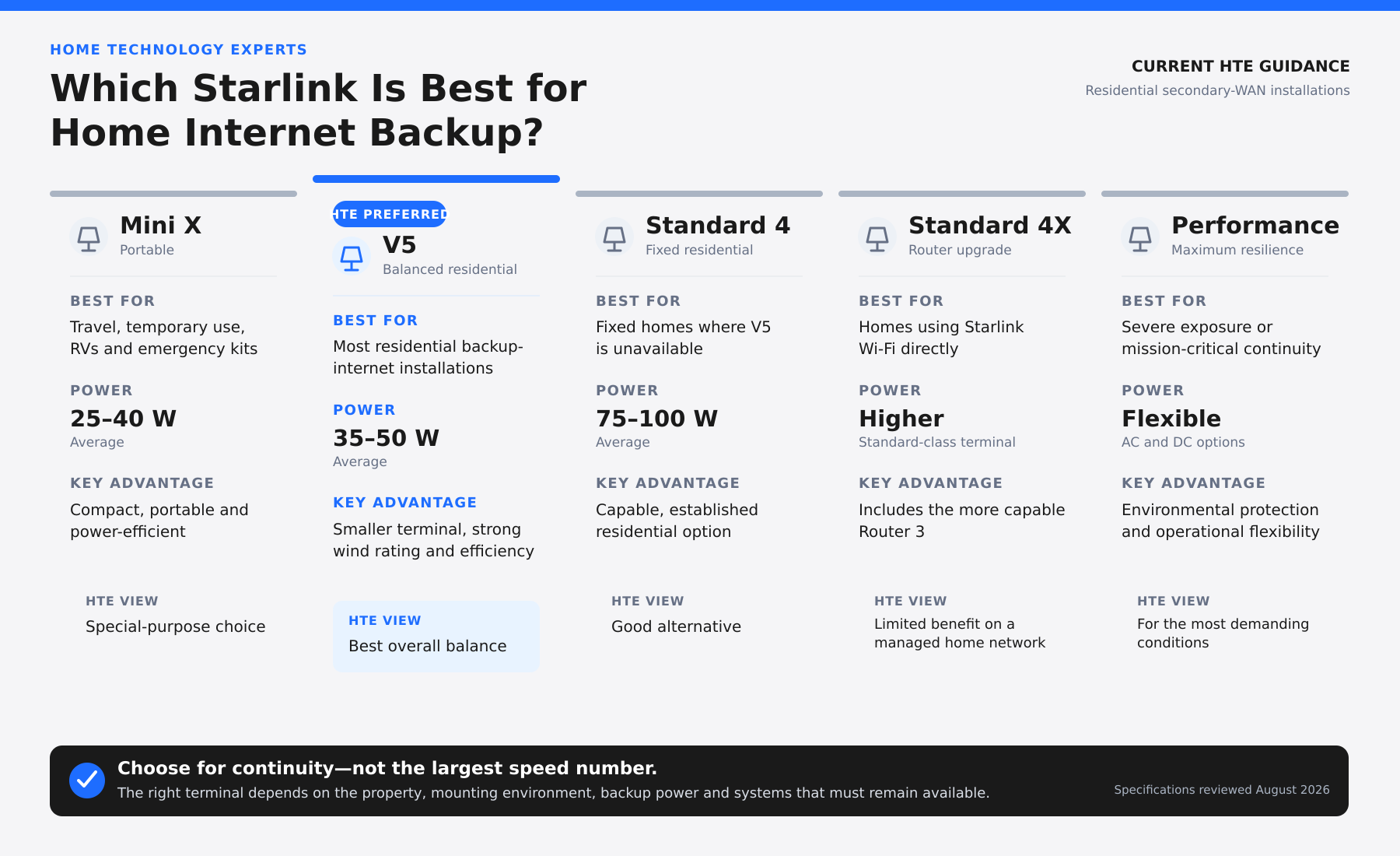
Starlink Home Internet Backup Comparison
Frequently Asked Questions
Will Starlink replace the home’s existing Wi-Fi system?

Starlink Installation
No. In most HTE installations, Starlink supplies an internet connection to the home’s primary network. The existing wired network and professionally installed Wi-Fi access points continue to serve the property.
Is V5 slower than Standard 4?
V5 has a slightly lower advertised maximum capability, but actual speeds vary. For secondary-WAN use, the small difference in maximum throughput is generally less important than power consumption, mounting, reliability and installation suitability.
Does Standard 4X provide a faster satellite connection?
Its principal advantage is the included Router 3 and its improved local Wi-Fi coverage. That benefit is less relevant when the home already has a professionally managed network.
Can the home switch to Starlink automatically?
Yes, when the primary router or firewall supports dual-WAN failover and the system is properly configured. The precise behavior depends on the network design.
Will everything in the home continue working during failover?
Many services can continue operating, but an internet transition may briefly interrupt active calls, streams or remote sessions. Certain systems may also depend on the primary provider’s public IP address, bandwidth or other connection-specific features. These requirements should be reviewed during system design.
LEARN MORE:
STARLINK INSTALLATION COST CALCULATOR
CRADLEPOINT WIDEBAND ADAPTERS VS STARLINK IN THE HAMPTONS
Product specifications reviewed August 2026.