
Introducing Control4 X4: New User Interface for Your Smart Home
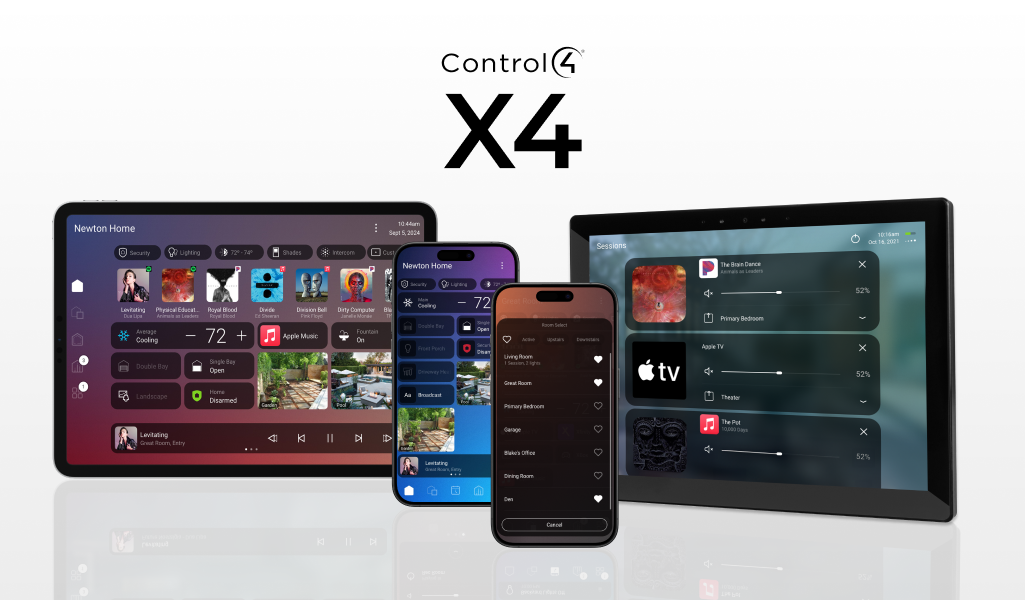
Control4 just unveiled the new Control4 X4 interface—a game-changer in smart home technology. Designed to empower you, the homeowner, Control4 X4 brings a fresh, intuitive experience to managing your home automation, making it simpler, more enjoyable, and more personalized than ever before.
What Makes Control4 X4 So Exciting?
Control4 X4 is all about making your smart home work for you, seamlessly adapting to your evolving needs without the hassle of constant updates from integrators. This new interface empowers you to take control, making adjustments on your own schedule, easily and intuitively.
As Darin Theurer, Principal Product Manager at Snap One, puts it: "Control4 X4 is an evolutionary milestone for Control4, offering significant benefits to both end-users and our partners. We’ve set the bar high with Control4 X4, pushing the boundaries of what’s possible in home automation and control."
How Control4 X4 Enhances Your Experience
User-Friendly Customization: One of the standout features of Control4 X4 is its ability to let you fine-tune your smart home experience with ease. With new tools like Routines and Widgets, you can create, modify, and schedule custom automations directly from the Control4 App. Whether it’s adjusting lighting based on your evening habits or setting up your home security to fit your weekend plans, Control4 X4 puts the power in your hands.
Simplified Daily Interactions: The new interface also lets you set favorites and shortcuts for quick access to your most-used controls and scenes, making daily interactions smoother than ever. Imagine a single tap to set your home to “Movie Night” mode or to activate a security routine before bed.
Modern and Intuitive Design: Control4 X4 introduces a sleek, minimalist design that is not only visually appealing but also easy to navigate, even if you’re not tech-savvy. The new navigation design makes it simple to add new devices and systems to your smart home, all seamlessly integrated into the Control4 X4 interface.
Deeper Integration with Apple Products: If you’re an Apple user, you’ll love the enhanced Apple HomeKit functionality, which allows for unified management of your Control4 system across Apple devices like CarPlay, iPhone Control Center, and Mac Desktop. You can even launch scenes via Siri and fine-tune settings for individual devices.

Benefits for You—And Your Installer
Control4 X4 not only enhances your experience but also improves the overall efficiency of the smart home system. With the ability to make tweaks and adjustments yourself, you save time and effort that might otherwise involve reaching out to an installer for minor changes. This added self-sufficiency means fewer service calls and more immediate control over your home environment.
For integrators, this shift to a more user-driven experience allows them to focus on delivering value through new projects and advanced support. Installers can still set up initial automations, but you can then modify these as needed, ensuring your system remains perfectly aligned with your lifestyle.
When Can You Experience Control4 X4?
Control4 X4 is set to replace the existing Control4 OS 3.4.2 and the OS3 App. It will be available as an early-access release to partners in the United States starting early next year, with a broader international rollout to follow.
Take Your Smart Home to the Next Level with Control4 X4
Control4 X4 redefines what’s possible in home automation, giving you a smarter, more personalized, and more enjoyable experience. With its easy-to-use design and enhanced functionality, managing your home has never been simpler or more empowering. Get ready to enjoy a new level of control with Control4 X4, and experience your smart home like never before!

Frequently Asked Questions: Introducing Control4 X4
What is Control4 X4?
Control4 X4 is the newest user interface and operating experience for Control4 smart home systems. It introduces a redesigned, more intuitive way to manage lighting, entertainment, security, climate, and automation throughout the home.
How is Control4 X4 different from previous Control4 versions?
Control4 X4 focuses heavily on user empowerment and personalization. Unlike previous versions that often required integrator assistance for smaller adjustments, X4 allows homeowners to create routines, customize dashboards, adjust automations, and manage favorites directly from the Control4 app.
It also features:
A modernized interface
Faster navigation
Improved customization tools
Enhanced Apple Home integration
Simplified automation management
What are Routines in Control4 X4?
Routines are customizable automations that allow homeowners to schedule or trigger actions based on time, activities, or preferences.
Examples include:
Automatically dimming lights at sunset
Activating security settings at bedtime
Adjusting climate settings during work hours
Creating “Movie Night” or “Away” scenes
These routines can now be created and modified directly by the homeowner.
What are Widgets in Control4 X4?
Widgets provide quick access to frequently used controls and information within the Control4 interface. They help personalize the dashboard experience and make everyday interactions faster and more convenient.
Can homeowners make their own changes without an integrator?
Yes. One of the biggest advantages of Control4 X4 is increased homeowner control. Users can make many day-to-day adjustments themselves, including:
Editing routines
Setting favorites
Adjusting scenes
Customizing shortcuts
Managing certain automation behaviors
Professional integrators still handle advanced programming and system design, but homeowners gain much more flexibility for everyday use.
Is Control4 X4 easier to use?
Yes. Control4 X4 was designed with a cleaner, more intuitive interface that simplifies navigation for all users, including those who are not particularly tech-savvy.
The interface focuses on:
Streamlined menus
Faster access to controls
Minimalist design
Easier device management
More responsive interactions
Does Control4 X4 work with Apple HomeKit?
Yes. Control4 X4 includes deeper Apple HomeKit integration, allowing homeowners to manage their Control4 system across Apple devices and services.
This includes compatibility with:
Siri voice control
Apple CarPlay
iPhone Control Center
Mac desktop controls
Apple Home app functionality
Can I use Siri with Control4 X4?
Yes. With Apple HomeKit integration, homeowners can use Siri voice commands to activate scenes, control devices, and manage smart home functions.
Will Control4 X4 improve my daily smart home experience?
For most homeowners, yes. The platform is designed to reduce friction in daily interactions by making automation faster, easier, and more personalized.
Features like favorites, shortcuts, routines, and simplified navigation make common tasks more convenient and accessible.
Does Control4 X4 replace the existing Control4 app?
Yes. Control4 X4 is intended to replace Control4 OS 3.4.2 and the existing OS3 app experience over time.
Will I need new hardware to use Control4 X4?
Compatibility depends on your current Control4 system and hardware configuration. Some older systems or devices may require updates or upgrades to fully support the new X4 experience.
Home Technology Experts can evaluate your system and determine compatibility requirements.
Is Control4 X4 only for new smart homes?
No. Existing Control4 homeowners may also be able to upgrade to Control4 X4, depending on system compatibility and hardware requirements.
What are the benefits for installers and integrators?
Control4 X4 improves efficiency for integrators by allowing homeowners to handle smaller personalization changes independently. This reduces unnecessary service calls and allows integrators to focus on system design, upgrades, and advanced support.
Does Control4 X4 support customization?
Absolutely. Personalization is one of the platform’s biggest strengths. Homeowners can tailor their experience around their lifestyle, habits, and preferences without needing extensive technical knowledge.
When will Control4 X4 become available?
Control4 X4 is expected to launch as an early-access release for U.S. partners beginning next year, with broader availability and international rollout to follow.
Can Home Technology Experts help upgrade my system to Control4 X4?
Yes. Home Technology Experts can help determine whether your current system is compatible with Control4 X4 and guide you through upgrades, migration, and customization.
Why is Control4 X4 important for the future of smart homes?
Control4 X4 represents a major shift toward smarter, more user-driven home automation. It combines professional-grade integration with homeowner-friendly customization, giving users more control while maintaining the reliability and sophistication expected from a luxury smart home system.
How do I learn more about upgrading to Control4 X4?
Contact Home Technology Experts to discuss your current Control4 system, compatibility options, and how Control4 X4 can enhance your smart home experience.